You cannot select more than 25 topics
Topics must start with a letter or number, can include dashes ('-') and can be up to 35 characters long.
 e94f9637b6
Backend improvements: - Add Server-Sent Events endpoint (/api/progress/<session_id>) - Implement _do_download_with_progress() to track yt-dlp progress in real-time - Parse yt-dlp output to extract percentage, speed, and ETA - Run downloads in background threads (non-blocking) - Store progress in download_sessions dict with thread-safe locks - Download API now returns immediately with session_id Frontend improvements: - Add beautiful animated progress bar with gradient - Display real-time percentage, speed, and ETA - Connect to SSE stream for live updates - Show progress section during download - Auto-hide progress and show results when completed - Handle errors gracefully with proper cleanup User experience: - No more blocking downloads - instant response - See live progress as video downloads - Visual feedback with smooth animations - Clean transition from progress to download results 🤖 Generated with [Claude Code](https://claude.com/claude-code) Co-Authored-By: Claude <noreply@anthropic.com> |
10 months ago | |
|---|---|---|
| docs | 10 months ago | |
| templates | 10 months ago | |
| .dockerignore | 10 months ago | |
| .gitignore | 10 months ago | |
| Dockerfile | 10 months ago | |
| LICENSE | 10 months ago | |
| README.md | 10 months ago | |
| app.py | 10 months ago | |
| docker-compose.yml | 10 months ago | |
README.md
🎬 yt-dlp Web Interface
Interface web pour télécharger des vidéos YouTube, avec options de conversion et affichage détaillé. Utilise l'excellent yt-dlp. Le tout conteneurisé avec Docker/Podman. Codé avec mon ami : Claude AI


✨ Fonctionnalités
- 🔍 Analyse complète des formats vidéo et audio disponibles
- 🎯 Sélection précise des formats (qualité, codec, bitrate)
- ⚙️ Options de sortie personnalisables (MP4, MKV, WebM)
- 🎵 Transcodage audio (AAC, MP3, Opus) avec contrôle du bitrate
- 📦 Interface moderne et responsive
- 🐳 Conteneurisé pour un déploiement facile
- 🧹 Nettoyage automatique des fichiers entre les téléchargements
- 📋 Affichage de la commande exécutée pour transparence
🚀 Démarrage rapide
Avec Docker
docker pull raynoxis/yt-dlp-web-interface:latest
docker run -d -p 5000:5000 --name ytdlp-web raynoxis/yt-dlp-web-interface:latest
Avec Podman
podman pull raynoxis/yt-dlp-web-interface:latest
podman run -d -p 5000:5000 --name ytdlp-web raynoxis/yt-dlp-web-interface:latest
Avec Docker Compose
git clone https://github.com/Raynoxis/yt-dlp-Web-Interface.git
cd yt-dlp-Web-Interface
docker-compose up -d
Accédez à l'interface : http://localhost:5000
📖 Documentation
🛠️ Build depuis les sources
# Cloner le repo
git clone https://github.com/Raynoxis/yt-dlp-Web-Interface.git
cd yt-dlp-Web-Interface

# Build avec Docker
docker build -t raynoxis/yt-dlp-web-interface .

# Ou avec Podman
podman build -t raynoxis/yt-dlp-web-interface .

# Lancer
docker run -d -p 5000:5000 --name ytdlp-web raynoxis/yt-dlp-web-interface
🎯 Utilisation
- Collez l'URL d'une vidéo YouTube
- Cliquez sur "Analyser la vidéo"
- Sélectionnez les formats vidéo et audio souhaités
- Choisissez les options de sortie (conteneur, codec audio, bitrate)
- Cliquez sur "Télécharger"
- Téléchargez le fichier généré
📸 Screenshots
Etape 1
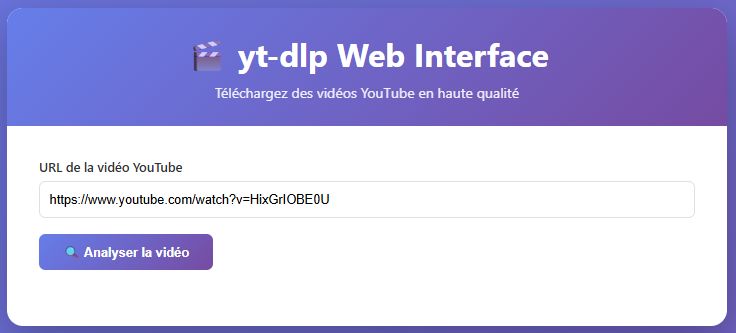
Etape 2

Etape 3

🔧 Configuration avancée
Volumes persistants
docker run -d \
  -p 5000:5000 \
  -v ./downloads:/app/downloads \
  --name ytdlp-web \
  raynoxis/yt-dlp-web-interface:latest
Variables d'environnement
docker run -d \
  -p 5000:5000 \
  -e FLASK_ENV=production \
  --name ytdlp-web \
  raynoxis/yt-dlp-web-interface:latest
Compose
version: '3.8'

services:
  ytdlp-webinterface:
    image: raynoxis/yt-dlp-web-interface:latest
    container_name: ytdlp-webinterface
    ports:
      - "5000:5000"
    volumes:
      - ./downloads:/app/downloads
    restart: unless-stopped
    environment:
      - FLASK_ENV=production
      - PYTHONUNBUFFERED=1
    healthcheck:
      test: ["CMD", "curl", "-f", "http://localhost:5000/"]
      interval: 30s
      timeout: 10s
      retries: 3
      start_period: 40s
🤝 Contribution
Les contributions sont les bienvenues ! N'hésitez pas à :
- Fork le projet
- Créer une branche (
git checkout -b feature/amelioration) - Commit vos changements (
git commit -am 'Ajout nouvelle fonctionnalité') - Push vers la branche (
git push origin feature/amelioration) - Ouvrir une Pull Request
📝 License
Ce projet est sous licence MIT. Voir le fichier LICENSE pour plus de détails.
🙏 Remerciements
- yt-dlp - Le meilleur outil de téléchargement vidéo
- Flask - Framework web Python
- FFmpeg - Traitement vidéo et audio
⚠️ Avertissement
Cet outil est destiné à un usage personnel et éducatif. Respectez les conditions d'utilisation de YouTube et les lois sur le droit d'auteur de votre pays.
📧 Contact
Raynoxis - GitHub
Lien du projet: https://github.com/Raynoxis/yt-dlp-Web-Interface
Lien Docker Hub: https://hub.docker.com/r/raynoxis/yt-dlp-web-interface